|

|
Central Purchasing
WebProl'IFIC can handle procurements made in a central unit or corporate office, incase of a hotel chain setup.
Some of the prerequisites required for this feature of central purchasing to work properly are:
1. The inventory items have to be defined at the chain/corporate level.
2. The suppliers also have to be defined at the chain/corporate level.
3. The inventory items procured at the central unit has to be marked as Central Purchase Items, in the Items Setup screen.
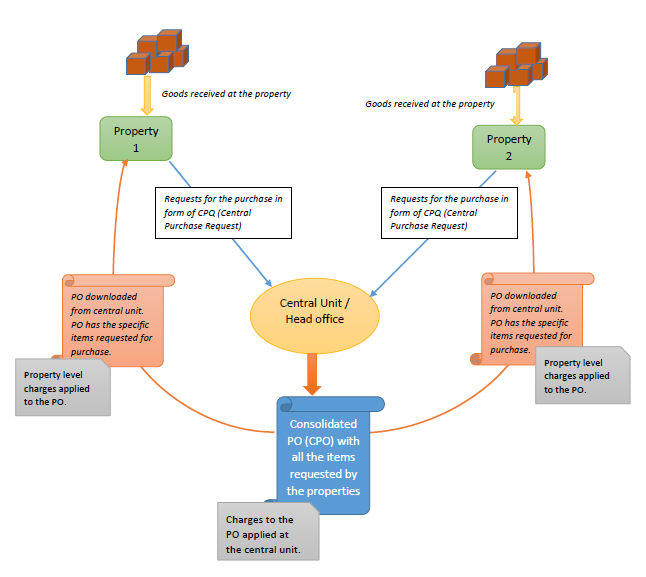
4. Create a document id as CPQ (Central Purchase Requisition) of type PQ for Requisitions & CPO (Central Purchase Order) of type RP for Purchase orders. This enables to distinguish central purchase requisitions & purchase orders from the normal ones. Also, define a document id for the Central Contract PO and map it to CP (Contract Purchase Order)
5. The central unit should be mapped for each of the properties, that use the feature of Central Purchasing.
6. To be able to receive alerts and emails at the Property for Purchase orders raised by the central unit, the alert id : ICPO should be linked to the users of the property.
The receipt of items against the purchase order raised by the central unit/corporate office, can be done at the property or at the central unit and transfer the stocks to the property later using the Inter-Unit Stock transfer feature of WebProl'IFIC
The process of central purchasing work in the following way: