

 
|

|
Documents
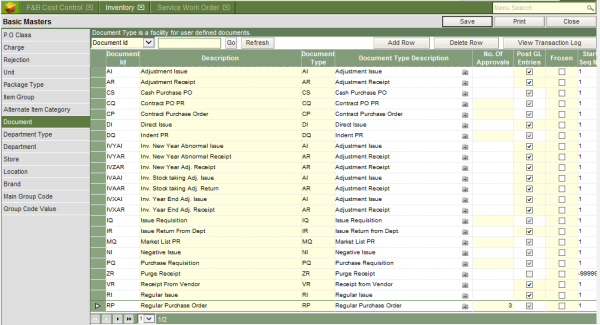
All the possible type of transactions required in maintaining inventory of items has been termed as document type in WebProl’IFIC. Each of the type of transactions has been assigned a unique two character code, which the system understands and has been already configured into the system at the time of installation. For example, a request or indent for purchase of items has been defined as PQ (Purchase Request). At the same time the system has the flexibility to allow the user to define his/her own abbreviations for a type of transaction, referred to as document, but the same needs to be mapped to the system defined document type. As an example, user may want to define the PQ (purchase request) as RPQ (Purchase request for regular items), which can be done by mapping RPQ to PQ.
To define the documents:
I. Type in the unique document id, which can be up to 4 characters long.
II. Type in the description of the document id.
III. Select the system defined generic document type, to which the document needs to be mapped.
IV. Define the number of approvals for the transactions, for which the hotel follows a policy of approvals.
 The
inventory module of WebProl’IFIC allows up to 3 levels of approval both
for purchase orders and indents/requisitions
The
inventory module of WebProl’IFIC allows up to 3 levels of approval both
for purchase orders and indents/requisitions
V. Click on the save button to save the information into the database.

