

 
|

|
Re-instate a requisition
Rejected requisitions can be re-instated after making necessary changes/modifications. Requisitions can be reinstated from the main requisitions screen
1. Open the rejected request/indent to be re-instated in the main requisition screen.
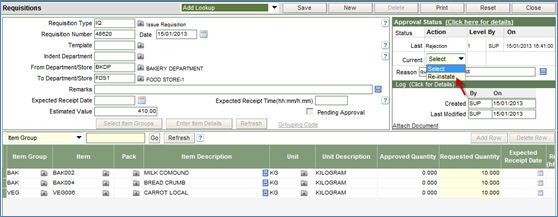
2. Select the option of re-instate from the drop down in the Current field of the status section of the screen.
3. Enter the reason for re-instating the requisition.
4. Click Save button to complete the process.
