|

|
Departments
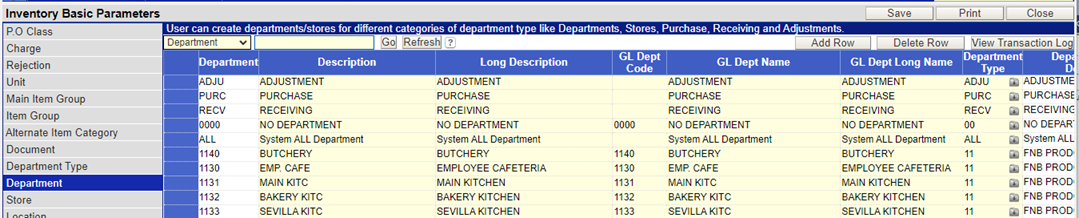
All the consumption centers, referred to as departments need to be defined in the Department master.
To define the departments:
I. Type in the 4 character unique department code.
II. Type in the description of the department code.
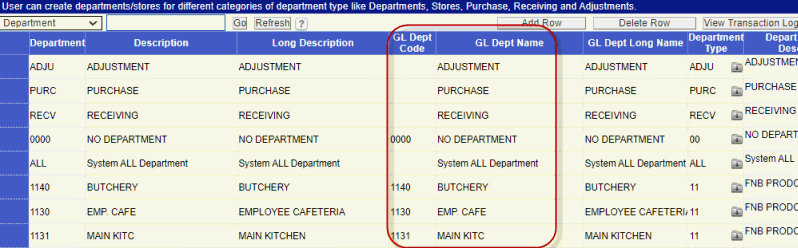
III. Map the department to the GL dept Code defined in general ledger.
IV. Select the Department type created earlier, in which the consumption center has to be categorized.
V. Click the Save button to store the information into the database.
Users access to each of the departments created have to be configured using the User and Department Link, present at the bottom of the screen.
To define the user access
Click on the link of User and Department at the bottom of the screen. The following screen is loaded
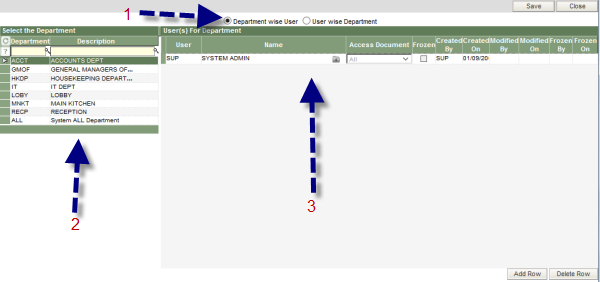
1. The information on the screen can be viewed in either of the two ways
Department wise User
2. The departments created earlier are listed in this part of the screen.
3. The users who will have access to the selected department are displayed here. To add a new user, click the Add Row button at the bottom of the screen, which will add a blank row to the spread sheet. Type in the user id and select the access level of the user to the transactions of the specific department. The various access levels available in the system are :
• All – documents/transactions created by any user for any department
• Self – documents/transactions created by the user id
• Department – documents/transactions created only for the specific department
• Department type – documents/transactions created for all departments of the specific department type.
User wise Department
2. The users defined in the system are listed in this part of the screen.
3. Enter the departments to which the specific user will have access. The process of adding the department is similar to adding the user, as explained above.
Departments for a Cost center setup
There is a provision to map the department codes created in inventory module to the ones defined in general ledger.